
Educate your customers about no-shows and late cancellations and invoice penalty fees, by sending automated emails to customers who cancel late or don't show up.
💡 What’s included
- Free extension that can be activated in the "Market"
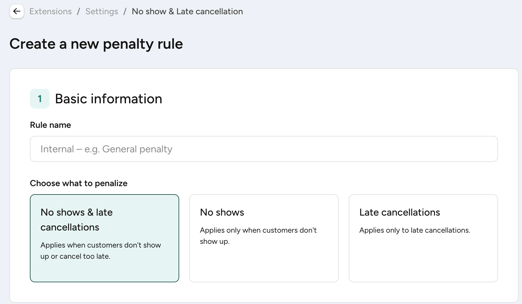
- Penalty rules for no-shows and/or late cancellations
- Set-up of multiple penalty rules tailored to your offerings
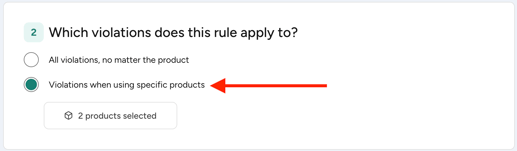
- Penalty rules can be tailored to a specific product (block card, time card and membership)
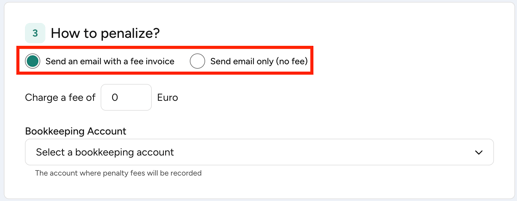
- Automatically issue invoices for penalty fees
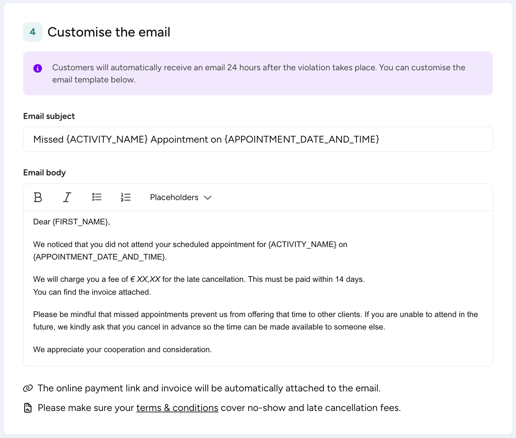
- Customisable and automated emails
📌 See it in action
Creating a new penalty rule:
Setting the rule for all or specific products:
Choosing how to penalise customers:
Customising the email:
⚒️ Get started
- Go to “Market”
- Activate the extension "No show & Late cancellation"
- Start the configuration of your penalty rules
(create as many rules as you need → tailored to your wishes and products) - Choose how to penalise your customers
- Customise the email
- Save the rule as a draft or activate it immediately
- The email is then automatically sent (24 hours after the activity) to customers that fit the settings of the penalty rule
➡️ Full guide
Please take a moment to carefully read our ➡️ Help Center article ⬅️ to learn about:
- how the feature works in detail
- how to configure the feature
- how to set-up penalty rules and fees
- how to customise the email
- how to handle exceptional situations